TradeScanners.com
Home Scanners Software, shredders & more... Information & advice Your account Contact us
Search  
Show prices inc VAT Home > Scanners > Document scanners > Fujitsu > Fi-5110C
Your basket   0 items   £0.00
Document scanners
< Back to your shortlist
Fujitsu scanners:
Fujitsu ScanSnap S300
Fujitsu ScanSnap S1300
Fujitsu Fi-60F
Fujitsu ScanSnap S1500
Fujitsu Fi-5110C
Fujitsu ScanSnap S1500M
Fujitsu Fi-5015C
Fujitsu Fi-6130
Fujitsu Fi-6230
Fujitsu Fi-6140
Fujitsu Fi-6240
Fujitsu Fi-5530C2
Fujitsu Fi-6750S
Fujitsu Fi-6010N
Fujitsu Fi-4340C
Fujitsu Fi-6670
Fujitsu Fi-6670A
Fujitsu Fi-6770
Fujitsu Fi-6770A
Fujitsu Fi-4860C2
Fujitsu Fi-6800
Fujitsu Fi-5900C
Discontinued scanners

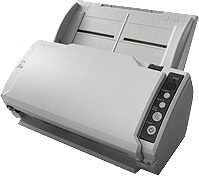
Fujitsu Fi-5110C

Fujitsu Fi-5110C Authorised Reseller
Add to comparison chart
Open image gallery
Specification Compare prices Consumables Alternatives
Price
£315.00 (ex VAT)Buy the Fujitsu Fi-5110C
Speed 15 ppm
Part # PA03360-B051
Max. paper size: A4
Colour mode: Colour, greyscale, black and white
Scanning side:   Duplex (both sides)
Duplex speed:   30 images per minute
Feeder capacity:   50 sheets
Interface: USB
Flatbed: No
Drivers:   TWAIN, ISIS
Compatibility: Windows 7, Windows Vista, Windows XP
* Windows 7 drivers may require downloading separately after scanner purchase
Free software included: ScandAll 21, Adobe Acrobat 6 & Abbyy FineReader
Driver download: Fujitsu Fi-5110C drivers
Sales brochure: Fujitsu Fi-5110C Brochure.pdf
Click here for your FREE
document management software
In stockNext working day delivery just a tenner
Fujitsu Fi-5110C rated 5 out of 57 reviews
Retails at £425.00
Only £315.00 (ex VAT)
How many would you like?
No cover required
3 Year Economy Package£94.50
This is our most popular service. Your machine will be protected for 3 years for all parts and labour in the event of break down and an engineer will be onsite within 3 days.
Why do I need protection?
1 Year 8hr Response + 8hr Fix£90.00
An engineer onsite within 8 hours and a fix or replacement within a further 8 hours. Cover for 12 months.
Why do I need protection?
1 Year 4hr Response + 4hr Fix£135.00
An engineer onsite within 4 hours and a fix or replacement within a further 4 hours. Cover for 12 months.
Why do I need protection?
3 Year 8hr Response + 8hr Fix£238.00
An engineer onsite within 8 hours and a fix or replacement within a further 8 hours. Cover for 36 months.
Why do I need protection?
3 Year 4hr Response + 4hr Fix£357.00
An engineer onsite within 4 hours and a fix or replacement within a further 4 hours. Cover for 36 months.
Why do I need protection?
Fi-5110C videos
Oops - we don't appear to have a video for the Fi-5110C.

Why not take a look on YouTube to find one?

Fujitsu Fi-5110C reviews
P Ferrari
The scanner is excellent. Fast, good quality, works well in duplex, easy to set up and operate and has worked seamlessly despite a heavy load.

The only criticism is that the scanner driver window will not stay in the background and becomes the active window at the beginning of each sheet scan. That makes it impossible to work on anything else while scanning is taking place.
Mark Godwin
The Fi-5110C is a very good scanner for the money. I was after a low priced volume scanner so that I could get rid of a lot of the paper that I get with my job and at home. This one does the job nicely. I have broken my review down in to the sections below:

PAPER handling.

This is the scanners weak point. Although very good at drawing paper through it is not very good at separating sheets. I have found that the best thing to do is to slightly fan out the sheets that are going to be scanned and then put a small crease in the side that will be fed in to the scanner. When you put the sheets together to be scanned, the small crease will be in a different place for each sheet. The scanner will then pull them through.

It will easily scan thin and long till receipts to quite heavy A4 paper and keep it aligned for straight scans.

The long paper mode is also quite useful and is easily changed with the scanners twain driver.

SPEED.

Very good for the money. I scan colour documents in duplex at 150/200dpi and each page is scanned in a few seconds.

I have also set the scanner to aggressively compress the images before they are sent to the computer. This has a slight loss in quality, but you can relax this setting to get the detail back.

Higher DPI's will make the scanning process longer and if you were to do this frequently for one or two sheets at a time, you would be better of with a flatbed scanner.

SCAN quality.

This is about average, but when you consider it is scanning in duplex and at speed it s not that bad. The quality can be improved, but the scan speed suffers and for me this defeats the point of have a volume scanner.

OTHER features.

It also has options to detect paper edges and paper thickness. The edge detection is very useful but it does not get the first page right. But if you're scanning 20 or so pages, cropping just one page is not a big deal. The paper thickness detection is not worth using, this just seems to cause problems that I can't get to the bottom of.

INTERFACE.

It uses a USB interface and I use the TWAIN drivers. The user interface has only crashed once which I think is perfectly acceptable.

I don't use any of the scan buttons on the front of the scanner as I am using Scansofts Paperport Pro and I don't use a lot of the other features. This scanner is a work horse a once set I have just used it (with the exception of the long paper mode).

SUMMARY.

Apart from the paper handling which can be very annoying, the speed, quality and over all configuration is very good.
Tony King
this little fella is the business. It works
super fast and the quality is excellent we are very happy with our purchase
Paul Dennis
I purchased this sheet feed scanner for scanning OCR forms using Autodata. It was easy to configure and performs the job perfectly. It has been used on a number of occasions when it was critical to get the forms through in a short period of time and it hasn't let me down. Be careful not to overload the sheet feeder (and make sure the sheets are well separated) else it may jam, but it is easy to pull the sheets out and re-feed them. I noticed a slight deformation at the bottom of the scanned image, but apparently this is normal for a sheet feed scanner, and hasn't caused any problems with the OCR software.
Neil Taylor
This scanner we find really easy to use and it takes up very little space and has revolutionised our office and made our photocopier redundent
Neil Dunkley
The scanner is just what we wanted, small quick and simple.
Bran
Firstly, we really don't know why we didn't get one of these earlier! It has paid for itself after just a few months. It really does what it says on the box, easy to use, quick and very compact so can fit on any desk. Also comes with full version of Adobe Acrobat which many may find useful.

One word of advice - it works better with something like Paperport as the software supplied with it we found a bit cumbersome.

And finally one bit of critique - it would be nice to be able to minimise the scanner dialogue box so one can continue working whilst the document is being scanned.
What Fujitsu have to say...
Ease of handling
Operating the Fujitsu Fi-5110C document management scanner is simple, intuitive, and user-friendly. By utilizing its integrated TWAIN or ISIS drivers, the scanner can be conveniently controlled from nearly every document management system. Functions like scan-to-fax, scan-to-print or scan-to-mail are easily activated via the scanner's programmable operator panel. Even addressing documents to the included ABBYY FineReader 7.0 Professional is easily possible.

Rapid processing
The Fi-5110C processes up to 15 pages per minute in simplex-mode and up to 30 images per minute in duplex-mode-these scan speeds apply to scanning in color at 150 dpi and A4 portrait. Even when scanning several hundred documents a day, the speedy paper transport ensures almost immediate access to the scan results. The intended information processing tasks are initiated without interruptions. The Fi-5110C can automatically create graphical formats like TIFF, JPEG or PDF. Included is also the full version of Adobe Acrobat 6.0 Standard, which enables the forwarding of scanned documents to be marked with comments or digital signatures. A High Speed USB 2.0 interface supports fast data transmission, even of high resolution image data.

Visibly good scanning results
Different from flatbed scanners that are designed for home or DTP use, the Fi-5110C scans at optical resolutions between 150 and 600 dpi with a maximum color depth of 24 bit. Fujitsu has specially developed this scanner for document capturing and processing applications and delivering optimized images. The visual quality can be automatically enhanced by making use of functions like image emphasis, error diffusion, moiré removal and dithering, relieving the operator from strenuous post scanning image editing. Even scanning forms with colored backgrounds can be optimized by defining a dropout color for blanking it out automatically.

Optional extension
For high volume document scanning in batches and subsequent archiving in monochrome mode, the optional Fujitsu SoftIPC software permits the user to select pre-defined scanning profiles for creating optimized images with even less effort.

Back to top

¹ Prices checked on retailers' websites on the previous day. Whilst we are confident these prices are correct we accept no responsibility for any inaccuracies. Prices based on single, on-line purchase of the same or closest equivalent product, excluding delivery. Promotional prices may vary.

Price promise   |   Terms & conditions   |   Privacy policy   |   TradeShredders.com   |   Contact us   |   Sitemap

Copyright © 2010 E File UK Ltd.
Registered office: E File UK Ltd. Atterbury, Milton Keynes MK10 9RG
Company registration number: 4315898   VAT no: 785 2676 82