TradeScanners.com
Home Scanners Software, shredders & more... Information & advice Your account Contact us
Search  
Show prices inc VAT Home > Scanners > Document scanners > Fujitsu > Discontinued > Fi-5220C
Your basket   0 items   £0.00
Document scanners
< Back to your shortlist
Fujitsu scanners:
Fujitsu ScanSnap S300
Fujitsu ScanSnap S1300
Fujitsu Fi-60F
Fujitsu ScanSnap S1500
Fujitsu Fi-5110C
Fujitsu ScanSnap S1500M
Fujitsu Fi-5015C
Fujitsu Fi-6130
Fujitsu Fi-6230
Fujitsu Fi-6140
Fujitsu Fi-6240
Fujitsu Fi-5530C2
Fujitsu Fi-6750S
Fujitsu Fi-6010N
Fujitsu Fi-4340C
Fujitsu Fi-6670
Fujitsu Fi-6670A
Fujitsu Fi-6770
Fujitsu Fi-6770A
Fujitsu Fi-4860C2
Fujitsu Fi-6800
Fujitsu Fi-5900C
Discontinued scanners

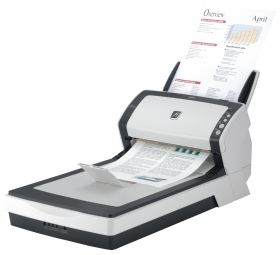
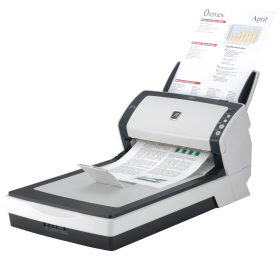
Fujitsu Fi-5220C

Fujitsu Fi-5220C Authorised Reseller
Add to comparison chart
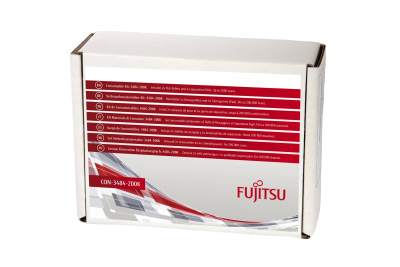
Specification Consumables
Price Discontinued
Speed 30 ppm
Part # PA03484-B531
Max. paper size: A4
Colour mode: Colour, greyscale, black and white
Scanning side:   Duplex (both sides)
Duplex speed:   60 images per minute
Feeder capacity:   50 sheets
Interface: USB, SCSI
Flatbed: Built in
Drivers:   TWAIN, ISIS
Compatibility: Windows 7, Windows Vista, Windows XP
* Windows 7 drivers may require downloading separately after scanner purchase
Free software included: ScandAll 21, Adobe Acrobat 8, Pixel Translations QuickScan Demo, Kofax VRS 4.2
Driver download: Fujitsu Fi-5220C drivers
Sales brochure: Fujitsu Fi-5220C Brochure.pdf
Click here for your FREE
document management software
Discontinued - Click here for replacement
Fujitsu Fi-5220C rated 5 out of 56 reviews
Fi-5220C videos
Oops - we don't appear to have a video for the Fi-5220C.

Why not take a look on YouTube to find one?

Fujitsu Fi-5220C reviews
James Moorcroft
We have found the Fujitsu a very quick printer with a reasonably friendly user interface. The dual feed/flatbed configuration is very useful. So far it has been reliable
W Hill
The scanner is quick to set up, fast, reliable and easy to operate.
However it has one big negative point in the Automatic Document Feeder.
It is claimed this will handle 50 sheets when in practice it has difficulty coping with 15. We have never managed to get it to operate with 20 or more sheets (80-90gsm) paper on the input chute and it generally only works consistently with a maximum of 12 - 15. This is not a problem for us, but could be a major headache for users with long scanning runs.
H Paintin
We have used this extensively and found this to be reliable and quick. We did have to purchase some OCR software separately ( approx £25) to suit our needs
P Welsby
I found the scanner easy to set up, and use once installed. Installation was tricky due to us using MS terminal services but setting up on a local machine couldn't be easier.

Scan quality is good with plenty of options within the software. OCR is also of a high standard and recognises almost 100% of text scanned, even on low quality proofs.
P Harrison
We have been impressed with the Scanner. To date it has been very reliable. However we have had a problem with the power cord.

We were very impressed with the support received to rectify this problem.
Brent Fairbanks
The only problem we have with the scanner is no matter what software we add it will not allow us to scan on paper in duplex form. The scanner does a very good job for the level of work we use it for.
What Fujitsu have to say...
The Fujitsu Fi-5220C document management scanner replaces the Fi-4220C2, offering faster scanning and ultrasonic multi-feed detection!

Quality
The Fi-5220C offers high quality output resolution up to 600dpi. Control over error diffusion, colour dropout and gamma correction via the driver allows a wide variety of documents to be scanned.

The user selectable black background enables the use of document deskew and autocropping of mixed document and high quality scanning of thin documents.

Additional features
With a slide away output tray the Fi-5220C can be positioned near the users workstation for ease of use. When not in use the scanner reverts to a standby mode using only 6 watts of power.

A "Scan" button on the scanner allows the scanning process to be started from the scanner.

A "Send" button allows the document to be scanned and sent to either your default printer or selected application on your PC.

Interface
The Fi-5220C has both an industry standard SCSI and USB 2.0 interface as standard.

Back to top

Price promise   |   Terms & conditions   |   Privacy policy   |   TradeShredders.com   |   Contact us   |   Sitemap

Copyright © 2010 E File UK Ltd.
Registered office: E File UK Ltd. Atterbury, Milton Keynes MK10 9RG
Company registration number: 4315898   VAT no: 785 2676 82