TradeScanners.com
Home Scanners Software, shredders & more... Information & advice Your account Contact us
Search  
Show prices inc VAT Home > Scanners > Document scanners > Fujitsu > Discontinued > ScanSnap S510
Your basket   0 items   £0.00
Document scanners
< Back to your shortlist
Fujitsu scanners:
Fujitsu ScanSnap S300
Fujitsu ScanSnap S1300
Fujitsu Fi-60F
Fujitsu ScanSnap S1500
Fujitsu Fi-5110C
Fujitsu ScanSnap S1500M
Fujitsu Fi-5015C
Fujitsu Fi-6130
Fujitsu Fi-6230
Fujitsu Fi-6140
Fujitsu Fi-6240
Fujitsu Fi-5530C2
Fujitsu Fi-6750S
Fujitsu Fi-6010N
Fujitsu Fi-4340C
Fujitsu Fi-6670
Fujitsu Fi-6670A
Fujitsu Fi-6770
Fujitsu Fi-6770A
Fujitsu Fi-4860C2
Fujitsu Fi-6800
Fujitsu Fi-5900C
Discontinued scanners

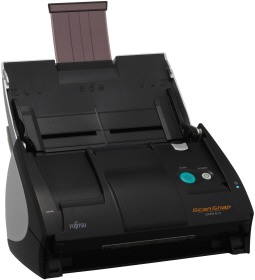
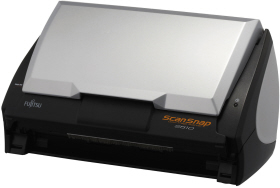
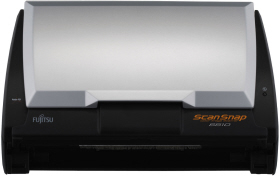
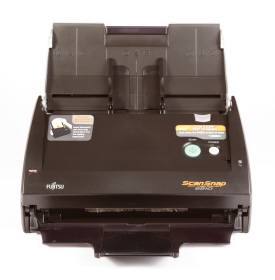
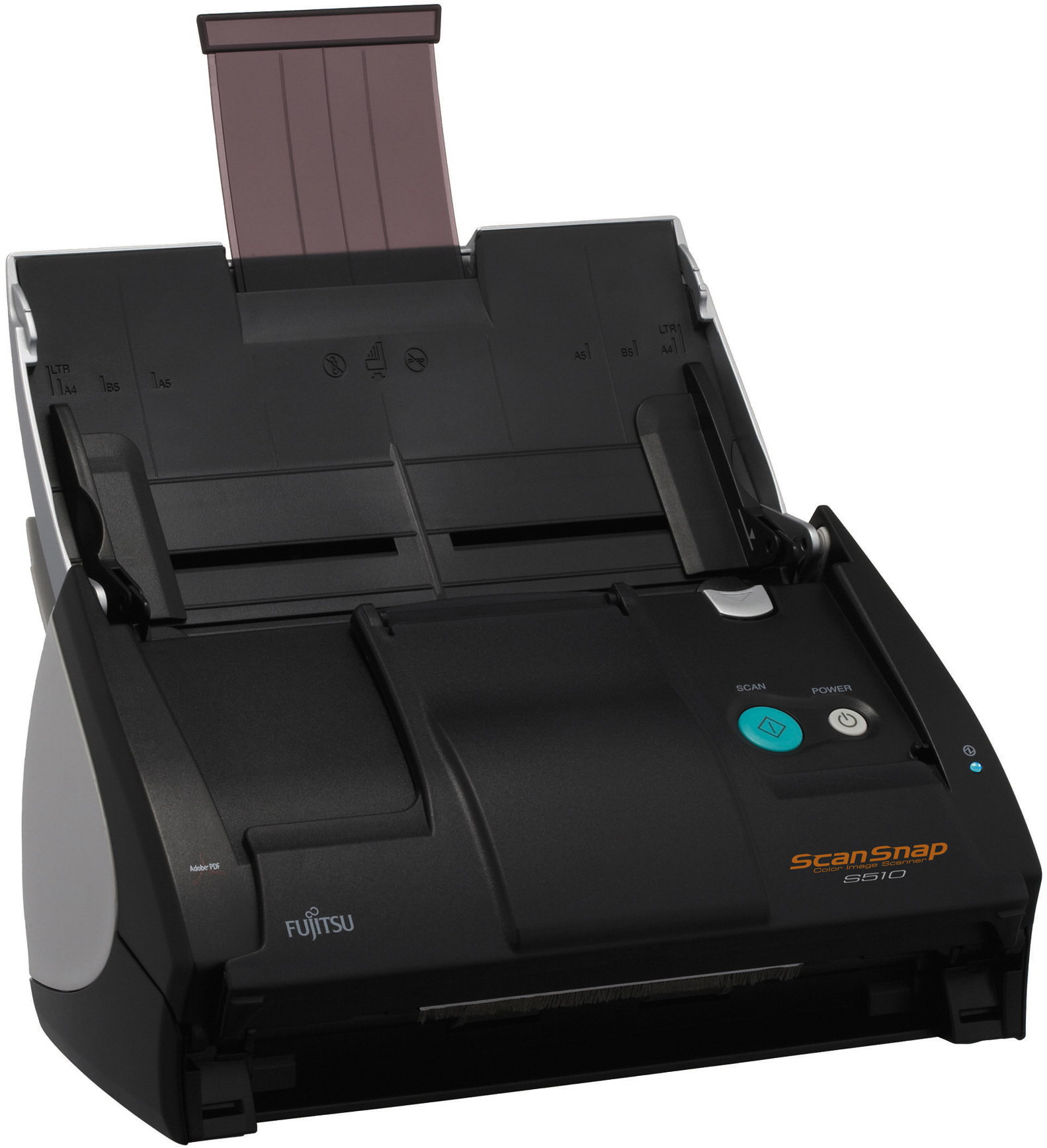
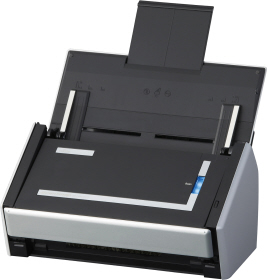
Fujitsu ScanSnap S510

Fujitsu ScanSnap S510 Authorised Reseller
Add to comparison chart
Open image gallery
Specification Consumables Alternatives
Price Discontinued
Speed 18 ppm
Max. paper size: A4
Colour mode: Colour, greyscale, black and white
Scanning side:   Duplex (both sides)
Duplex speed:   36 images per minute
Feeder capacity:   50 sheets
Interface: USB
Flatbed: No
Compatibility: Windows Vista, Windows XP
Windows 7: Notify me when Windows 7 drivers are available
Free software included: Adobe Acrobat 8.0 Standard, ScanSnap Manager v4.1, ABBYY FineReader for ScanSnap 3.0, CardMinder v3.1, ScanSnap Organizer v3.1 and Rack2-Filer (Trial version)
Driver download: Fujitsu ScanSnap S510 drivers
Sales brochure: Fujitsu ScanSnap S510 Brochure.pdf
Click here for your FREE
document management software
Discontinued - Click here for replacement
Fujitsu ScanSnap S510 rated 5 out of 520 reviews
ScanSnap S510 videos
Oops - we don't appear to have a video for the ScanSnap S510.

Why not take a look on YouTube to find one?

Fujitsu ScanSnap S510 reviews
Rob
I use one of these at work and it is a superb product as well as being simple to use - a one button press machine.
The ability of an A4 footprint machine to do A3 scans is a real bonus.
Rose SH
I chose this scanner as it has the most positive reviews. I ordered one and loaded all the software per the instruction. Struggled initially as I couldn't find the serial number of the Adobe Acrobat, but it was in package labelled clearly in blue. Apart from that, all went smoothly.

Can't believe how tiny the scanner is just two handful. I expected it to be bigger so it was a nice surprise. The scanner is amazingly easy to use, even for idiot like me. Got mixed up intially as I scan all documents double sided, then realize I had the duplex mode on. In all, I am very happy, it is very fast, just hope it will last for a long time.

No hesitation in recommending. June 08. Thank you to those write the reviews previously. Been most helpful!
Phil Chippendale
I bought this scanner from Tradescanners five months ago, and I've used it a great deal since then. I've been pleased with it, and with the sales support I had from Tradescanners. The scanner itself worked straight out of the box. The PDF software is very useful, pages can be inserted and deleted and moved around in the resulting PDF file, and made searchable as required, even in less common languages such as Greek. The only irritations are occasional paper misfeeds, and a tendency to cause streaking during colour scans if the inside is insufficiently clean. The scanner is not TWAIN compatible. I can't think of any advantage it would have it were TWAIN compatible, but I own a separate flatbed scanner. I'm glad I bought this one. Recommended.
Anish
Excellent. Easy to use and develop a backed-up up paperless system. Highly recommeded.
Andy Roland
I love the product. I am using it for home use - the objective is to put all my historic and current filing on to my p.c. In short to have a paperless house.

It appears, and is, very robust so far - I have input about 9000 sheets so far without problem. The very occasional misfeed is inevitably caused by me feeding in a sheet of paper in poor condition. It should be robust of course - just noticed the Fujitsu write up says suitable for light office use and equates that to one thousand sheets a day!!

The facilities offered in terms of paper handling are excellent - different paper sizes, skewed paper or print, paper submitted upside down or sideways etc are all corrected automatically for you. I have run at slow speed which is more than enough for me - on the grounds that this was a one off exercise so I might as well input everything with the best quality. When I experimented initially the higher speeds seemed to work very well too.

The software is really easy to use. Much more so than most printers for example. The facility to convert to searchable files is excellent. I only wish I could use this software on other pdf files I have that were not created by ScanSnap. It can't be that difficult for Fujitsu to enhance the software to do that? The conversion s/w to Word and Excel seems to work very well. Haven't tried PowerPoint conversion yet. Nor have I used the business card reading software.

Surprisingly little paper dust builds up in the machine. I have used conventional cleaning wipes to clear the scanner up to now. The manual does say though that one should only use proprietary Fujitsu Cleaner F1. It might have been an idea to supply one of these with the scanner together with instructions as to how to re-order.
STEVE PIKE
Excellant piece of equipment. Saves me alot of time when filing hard copies to PC.Rate it at [5]
Sunet Smit
I'm very satisfied with the ScanSnap S510 that we purchased. It's very user friendly and easy to use. It also allows me to manipulate documents quickly, which will normally be very time consuming if I had to type it in.
I was also very happy with the service and advice from your website and would definitely consider buying equipment from you in future.
Anita Keen
The scanner is great - small, compact and speedy. It hasn't caused me any problems when doing large documents and has been easy to use (even for a none techie). Only let down is the software for scanning business cards. It does not give you enough information from the card. It would be a fantastic all round machine if it did this more effectively. I had hoped I could create a spreadsheet from all my manager's business cards but the software seems to produce individual excel sheets rather than allowing a group of card details to be input into one sheet. So this was a real shame. It would be a wonderful upgrade if business card scanning allowed more details to be scanned into a single spreadsheet.
Kernow Consulting
I would give the scanner a rating of 5.

It is simplicity itself to use and produces excellent results incredibly quickly. We use it for both home and business, mainly in duplex mode, to archive documents and have managed to considerably reduce our bulky files. It has also banished my big file of receipt clippings to the shredder! The small footprint means that it sits on the desk ready for immediate use. The A3 adapter is excellent and works well, although I thought the instructions for it could be a little clearer.

So, small, fast, accurate, one touch operation and with a full copy of Adobe Acrobat - I can't recommend it highly enough.

Additionally, I also found that it is best to tape the outer part of the sheet to the adaptor to make sure that it feeds correctly - I think the sheer speed of the scanner is the problem. Perhaps the feeder could be tri-fold so that the document is securely held on both sides?
Richard Leonard
These units are extremely reliable and excellent value for money. I have purchased three in total and everybody who has one says they are fantastic.

Rating 5
Anna
Just to say as a user of the scanner, I have found it excellent for our business needs. It is neat on my desk top, easy to use and very efficient allowing us to scan multiple documents quickly. I am more than satisfied with our purchase and would recommend this particular model.

Thank you.
Stephen Turner
We bought the Scansap as a replacement for one that we'd had for a few years. We liked the original and this model is even better. Very quick scanner, compact, simple to operate, ideal for our use. We'd thoroughly recommend it.
Adrian Covill
This is the third fujitsu that I have had and in my view the best, there have been several design improvement and for someone like me that travels a lot its great.

The operation is intuitive and therefore easy the my snapscan organiser and the business cardminder are great- in my view for a stand alone application or small business you can't go wrong.
Timothy
This does exactly what it says on the tin! I am now scanning everything effortlessly and the software has assisted me immensely with my systems for a “paperless office”.

I am amazed by the speed and quality and would highly recommend this scanner. The speed of service from Trade Scanners was also excellent. A 5 star rating.
Nick James
The Fujitsu ScanSnap S510 scanner has been a brilliant buy, definately a 5. It couldn't be simpler or quicker to use and does everything we need it to (ie help us lose a lot of paper documents). In terms of value for moeny, it's probably the best pice of IT kit we've ever purchased.
Claire Thornton
I would rate the Fujitsu scanner as 4.5 out of 5.
The scanner is ridiculously easy to use - perfect for a techno bimbo like me. It gives you multiple options of how to save the document - i.e. not just PDF - which is an added bonus.
The 0.5 reduction from a 5 out of 5 is that if you have a large document it can get a little temperamental and you have to feed it through in sections as opposed to the
whole document in one go (it muddles pages and/or gets jammed).
However, the above does not detract from the fact that this is a fab little scanner that I would highly recommend.
Many thanks and kind regards
Claire
Mike Treleaven
Once I got it working the scanner is excellent - fast and simple to use. I had a problem with the software in that one of the discs was faulty. This was replaced by Fujitsu without a problem but as it had to come from Germany wnd in the middle of the postal strike it was a little delayed! The download option for the software didn't work
Karl McGlashon
Don't know how we ever operated a business without these scanners, we now have 3 in our office and they are worth their weight in gold. Tradescanners gave a great service. Item was delivered when they said it would, so really can't fault the service at all. I would defiantly buy from them again.
Jack Harper
Wonderful. Makes my all in one look like those children's typewriters.Compact. sheet feed, speed, accuracy, scans to pdf, colour and tremendous value. Wiill now encourage me to scan incoming paper to hard disk.
Zoe Repman
This is an excellent product. Very compact on the desktop and scans extremely well, both simplex and duplex, colour and B&W. The software that this comes with, that allows you to create PDF's and email, save or recognise text electronically is brilliant. The scanners have become an essential part of our day-to-day equipment and have cut down on manual filing.
What Fujitsu have to say...
ScanSnap S510 - The Paper Manager!
ScanSnap S510 now gains a Quick menu mode, just press place documents to be scanned, press the Green scan button, Quick Menu pops up allowing you to direct the resultant PDF file to a number of applications at the click of a mouse.

A complete desktop solution, simply press one scanner button to convert colour or mono multi page, doubled sided documents into digital PDF files which you can file, organise, share and email.

The ScanSnap software automatically creates Adobe PDF files which have become the de-facto standard for document exchange, enabling you to send documents anywhere in the world safe in the knowledge the recipient will see the document exactly as you see it.

ScanSnap Manager 4.1 software features:

  • Fast & easy creation of searchable PDF documents
  • Easy access to predefined scanning profiles
  • Allows files to be renamed at scan time
  • Continuous scanning, easily create PDFs greater than the ADF capacity
  • Password protect PDF files
  • A3 scanning using the Carrier sheets
  • Auto orientation alignment
  • ScanSnap Organiser allows you to file,organise, email, print, OCR and browse your scanned documents without the need to open them in Acrobat, It can also convert Scansnap scanned PDF's into fully searchable PDF as a background process.

    ScanSnap S510 can also scan information directly into either Word, Excel or PowerPoint 2003 via OCR using the Scan2xxxx functions integrated into the ScanSnap software or Drag and drop files within ScanSnap Manager to convert to Word, Excel or PowerPoint 2003 editable documents.

    To make scanning as simple as possible, ScanSnap inspects each document to decide if a document should be scanned in black and white or colour, what the size of the page being scanned is and eliminate blank pages, all of which serve to speed the scanning operation and minimise your storage requirements.

    In addition each document will have misaligned text corrected (Auto Deskew) and each page will be have its orientation automatically adjusted.

    ScanSnap also includes CardMinder ver 3.1, an application which can intelligently capture the information from business cards. Cardminder now includes IntelliSync which enables the data to be exported to a number of PM applications.

    The information captured is available across the range of Windows applications, simply highlight a person or company name within your document or application, press Alt-F3 on the PC keyboard and the related business card images will pop onto your screen as an instant aide memoire of that persons job function, address, contact details etc.

    The underling database can be stored and exported to a variety of PIM software such as OutLook, ACT and Goldmine via the IntelliSync.

    Using the supplied carrier sheet provides A3 scanning capability, A3 pages are folded and placed in the carrier sheet, when scanned, Scansnap will automatically stitch the 2 (front & back) images together to recreate the full A3 image.

    The carrier sheet can also be used for scanning photos/documents which might be easily scratched or irregular shaped documents which are difficult to feed otherwise and may cause paper jams.

    ScanSnap incorporates a 50 page automatic document feeder, duplex capability and colour scanning within a surprisingly small footprint and is supplied with a full version of Adobe® Acrobat® 8.0

    Note: The ScanSnap device driver does not support the TWAIN or ISIS protocol. Scanned images cannot be acquired directly from a TWAIN or ISIS

    Back to top

    Price promise   |   Terms & conditions   |   Privacy policy   |   TradeShredders.com   |   Contact us   |   Sitemap

    Copyright © 2010 E File UK Ltd.
    Registered office: E File UK Ltd. Atterbury, Milton Keynes MK10 9RG
    Company registration number: 4315898   VAT no: 785 2676 82