TradeScanners.com
Home Scanners Software, shredders & more... Information & advice Your account Contact us
Search  
Show prices inc VAT Home > Scanners > Document scanners > Xerox > DocuMate 152
Your basket   0 items   £0.00
Document scanners
< Back to your shortlist
Xerox scanners:
Xerox Documate 515
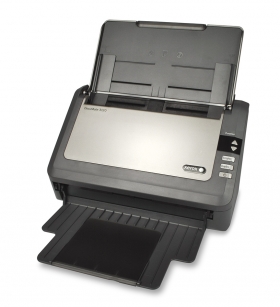
Xerox DocuMate 152
Xerox DocuMate 162
Xerox DocuMate 262
Xerox DocuMate 262i
Xerox DocuMate 3640
Xerox DocuMate 3640 With Kofax VRS
Xerox DocuMate 752
Discontinued scanners

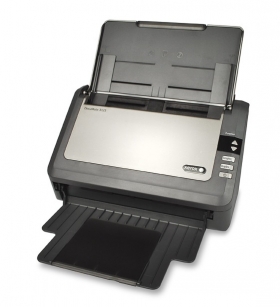
Xerox DocuMate 152

Xerox DocuMate 152 Authorised Reseller
Add to comparison chart
Specification Compare prices Consumables Alternatives
Price
£355.00 (ex VAT)Buy the Xerox DocuMate 152
Speed 18 ppm
Part # 90-8019-800
Max. paper size: A4
Colour mode: Colour, greyscale, black and white
Scanning side:   Duplex (both sides)
Duplex speed:   36 images per minute
Feeder capacity:   50 sheets
Interface: USB
Flatbed: No
Drivers:   TWAIN, ISIS
Compatibility: Windows 7, Windows Vista, Windows XP
* Windows 7 drivers may require downloading separately after scanner purchase
Free software included: PaperPort Pro 11, OmniPage Pro, Arc Soft PhotoImpression, NewSoft Presto! BizCard, X1 Search Client for Documents
Driver download: Xerox DocuMate 152 drivers
Sales brochure: Xerox DocuMate 152 Brochure.pdf
Click here for your FREE
document management software
In stockNext working day delivery just a tenner
Xerox DocuMate 152 rated 4 out of 57 reviews
Retails at £370.00
Only £355.00 (ex VAT)
How many would you like?
No cover required
3 Year Economy Package£106.50
This is our most popular service. Your machine will be protected for 3 years for all parts and labour in the event of break down and an engineer will be onsite within 3 days.
Why do I need protection?
1 Year 8hr Response + 8hr Fix£120.00
An engineer onsite within 8 hours and a fix or replacement within a further 8 hours. Cover for 12 months.
Why do I need protection?
1 Year 4hr Response + 4hr Fix£180.00
An engineer onsite within 4 hours and a fix or replacement within a further 4 hours. Cover for 12 months.
Why do I need protection?
3 Year 8hr Response + 8hr Fix£306.00
An engineer onsite within 8 hours and a fix or replacement within a further 8 hours. Cover for 36 months.
Why do I need protection?
3 Year 4hr Response + 4hr Fix£459.00
An engineer onsite within 4 hours and a fix or replacement within a further 4 hours. Cover for 36 months.
Why do I need protection?
DocuMate 152 videos
Oops - we don't appear to have a video for the DocuMate 152.

Why not take a look on YouTube to find one?

Xerox DocuMate 152 reviews
Bruce Richardson
We have had this scanner for a while now and have found it to scan everything we have tried. It is easy to setup and use and fast in use.

There is 1 slight problem and that is the scanned pages are not always square, but this is easily corrected.

The supplied software works well and easily understood.

This scanner is well worth the price.
Clint Hughes
I found the product easy to assemble and the software was also easy to install and indeed to use. The quality of the scanning of documents is also evident when converting files to Word as unlike with our previous scanner I am not finding myself making endless amendments. My only criticism would be the feed to the scanner as this can sometimes be a little awkward and can occasionally chew paper. However when you have previously used a flatbed scanner there is very little to complain about as documents can be scanned almost instantly.

Overall I would give the product 4 out of 5.
Gavin Smith
We are not scanning large numbers of documents, but the Documate 152 gobbles up what we put through it and the results are good. The destination and format of the output can be easily changed, which helps usability greatly. This has been an excellent buy for us.
Richard Gill
more than happy with our DocuMate. It's small, sits in a very small space, the software is straightforward and even I can use it; not to it's full capacity I daresay, but it does what I want it to do very efficiently. I also consider that the price was very reasonable compared to alternative products and aligning it to our existing IT system seemed fairlystraightforward.
tony dorren
I can say that I am delighted with my Visioneer Xerox DocuMate 152. I had to change when I upgraded to Vista and found that my previous scanner was not supported. I was surprised to find that your offering enabled me to put it on my desk (footprint 1/5 of previous scanner) and it operated about 10 times faster. So far no problems - I am quite impressed and rate it 5 excellent.
Don Turner
We're very impressed with the Xerox Document 152 as it has enabled our office to become completely paperless. One of the best features is that it can scan both duplex (both sides) and very small documents like receipts. It has struggled once or twice with very thin paper where the scans come out black but this is easily resolved by putting the thin piece onto a thicker piece of paper. It is super fast, reliable and easy to use once you get it setup correctly.

Not a great fan of the bundled software which feels quite clunky so have opted to use Adobe Acrobat 7 Professional for all our scanning, which also does the OCR so the scanned PDFs are searchable.
Chris Meyler
I recently purchased a Xerox DocuMate 152 scanner. This automatic document feed scanner made my old flatbed seem archaic by comparison. Easy to use and very compact. Service form tradescanners.com was professional and highly efficient. The follow up phone call confirmed their commitment to first class customer service in my opinion. Many thanks, keep it up.
What Xerox have to say...
Do you want to do more with the paper on your desk? Would you like to copy it, collate it, file it, search it, mail it and make it disappear? Sounds time consuming doesn't it? How about if you could do all that with just one touch? The Visioneer Xerox DocuMate 152 document management scanner is a new desktop scanner that can do all this and more. The DocuMate 152 includes Visioneer OneTouch technology, X1 Enterprise Client and an advanced TWAIN driver that will allow you to communicate with hundreds of enterprise content management (ECM) and document image management (DIM) software solutions with the press of a single button. It will not only make your paper more productive but make you look good too.

Document imaging is rapidly growing in nearly every business today. As more users adopt scanning solutions at the desktop, it has become clear that ease-of-use is a key feature. Most new users in document imaging are not scanner experts, so simplified, point-and-click solutions that deliver high quality images and integration with business applications are in demand.

The DocuMate 152 is a hi-speed, duplex color scanner that offers convenience and connectivity. With an amazingly small footprint, the scanner fits comfortably on any desk making it the perfect solution for small and large paper-intensive business that desire the capability to quickly convert paper documents into searchable PDF files that are easily shared, organized and protected, including corporations within the banking, education, energy, financial, government, healthcare and manufacturing industries. The DocuMate 152 features reliable paper-handling from business cards and checks to legal-sized and other long documents, as well as high speed USB 2.0 connectivity.

The Xerox DocuMate 152, color sheetfed document scanner, scans up to 30 images per minute (ipm) in duplex mode, includes a 50-page automatic document feeder and has the ability to automatically scan documents into searchable PDF files. The Xerox DocuMate 152 was designed specifically for desktop use and incorporates OneTouch technology for eliminating multiple steps in sending scanned documents to predetermined applications or devices. The scanner offers a professional software bundle that includes ScanSoft PaperPort and OmniPage Pro. It also ships with an advanced TWAIN driver developed by JFL Peripheral Solutions to enable communication with advanced electronic content management (ECM) software applications.

The power of Visioneer OneTouch
Visioneer OneTouch technology also allows users to easily set the "destination" of their scanned documents by pressing a button and selecting one of nine pre-programmed (or user-customizable) scan settings. "Destination" examples include scan to searchable PDF, scan to e-mail, scan to print, scan to archive, scan to network, and scan to OCR.

Back to top

¹ Prices checked on retailers' websites on the previous day. Whilst we are confident these prices are correct we accept no responsibility for any inaccuracies. Prices based on single, on-line purchase of the same or closest equivalent product, excluding delivery. Promotional prices may vary.

Price promise   |   Terms & conditions   |   Privacy policy   |   TradeShredders.com   |   Contact us   |   Sitemap

Copyright © 2010 E File UK Ltd.
Registered office: E File UK Ltd. Atterbury, Milton Keynes MK10 9RG
Company registration number: 4315898   VAT no: 785 2676 82